The top 20 business email etiquette rules
9 May 2024
0 min read
Introduction
As people, we tend to communicate over email in ways we wouldn’t in person. It’s easy to slip into the habit of writing emails informally with abbreviations, slang, and poor grammar.
But this is where common mistakes can occur: mistakes that can have serious business consequences.
This makes learning email etiquette, especially email signature etiquette, important for any business professional.
What is business email etiquette?
Business email etiquette is the set of rules and guidelines that govern the proper use of email in a professional setting.
Proper business email etiquette is essential for effective communication in a professional setting, and can have a significant impact on your success in the business world. It matters for several reasons:
Clarity: Clear and well-structured emails are more likely to be understood and acted upon.
Reputation: Poorly written or unprofessional emails can damage your reputation and the reputation of your organization.
Relationship building: Following email etiquette helps build and maintain positive relationships with clients, colleagues, and other business contacts.
Consistent, professional email signatures
Centralized email signature management for Microsoft 365, Google Workspace, and Exchange Online
Our email signature management solution helps ensure every email ends with a consistent, professional signature — strengthening your brand identity and ensuring the professionalism of your emails.
Explore nowTop 20 business email etiquette rules
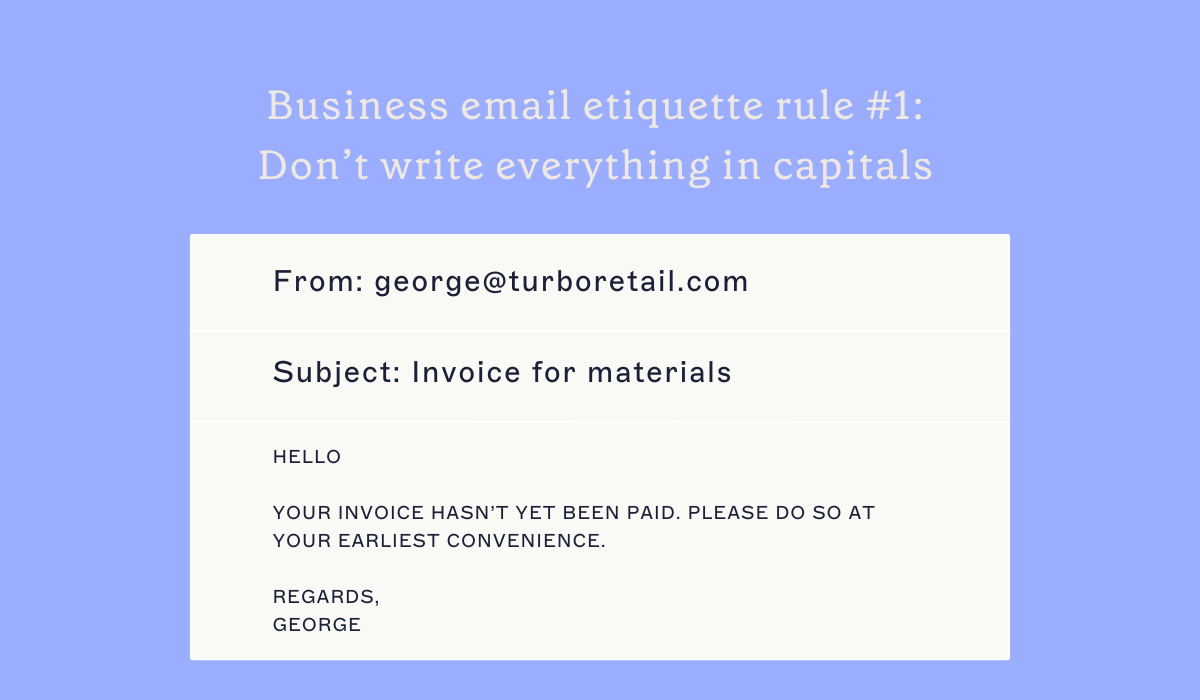
1. Don’t write everything in capitals
Overusing capitalization or excessive exclamation points can convey an aggressive, rude, or desperate tone. This is especially crucial when sending emails with negative feedback or urgent requests.
Instead of relying solely on punctuation marks, employ appropriate language and an effective tone to convey your message. This means you'll maintain a professional image and prevent any misunderstandings.
2. BCC recipients or use a mail merge
This is one of the most common email etiquette mistakes people make. When you send an email to multiple recipients, it's important to use the correct contact field:
To: These are the contacts you are directly emailing. Remember, everyone will be able to see the address of each recipient.
CC: Also known as "carbon copy" or "courtesy copy", this field indicates that the email is for informational purposes only. It's often used to keep people informed without directly addressing them.
BCC: Short for "blind carbon copy," this works similarly to the "CC:" field. The main difference is that all recipients' email addresses are not publicly visible. Use this field sparingly and only for multiple recipients who don't know each other.
3. Never discuss confidential information
Emails are easy to copy, print, and forward. They’re also surprisingly easy to intercept by malicious outside parties. If the information is highly sensitive, don’t send it over email. As far as email etiquette ideas go, confidentiality should always be paramount.
Even if the email isn’t forwarded, company management will see if you’re sending inappropriate messages and not using proper email etiquette.
4. Be careful using abbreviations or emoticons
You wouldn’t use slang when speaking to another professional in person. Email etiquette dictates that the same is true over email.
Abbreviations like LOL (Laugh Out Loud) or BRB (Be Right Back) are for instant messages with friends, not business. Some people may also not understand abbreviations and just get confused.
Emoticons may be a fun way to show emotions, but they can look very unprofessional. It’s better to say what you mean instead.
5. Don't write an email that's too long
Email is meant to be a quick and convenient form of communication. However, some individuals tend to write long, elaborate emails that can overwhelm the recipient. With the average worker receiving 121 emails daily, you’re wasting your own time writing lengthy messages.
To avoid this email mistake, keep your message concise and focused. Avoid rambling or excessive information. Instead, get straight to the main point while maintaining clarity. Assume the recipient is busy by making the copy as brief and straightforward as possible. Remove unnecessary wording, simplify sentences, and use bullet points if needed.
6. Don’t request delivery and read receipts
This is email etiquette 101. Read receipts will annoy recipients before they even read your message.
Also, they don’t always work as intended. Some recipients may block the receipt function, or their email software might not support them. If you want to know if a recipient has received your email, ask them directly.
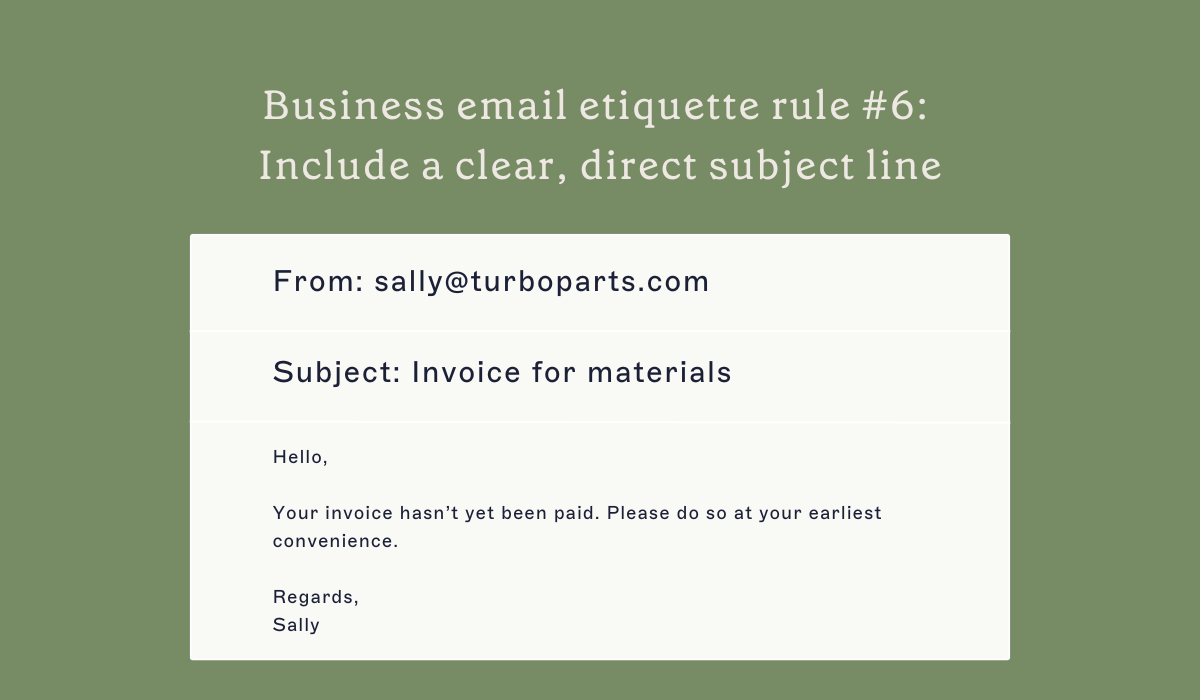
7. Include a clear, direct subject line
Having a strong subject line is essential for achieving high email engagement. With workers receiving an overwhelming number of emails every day, a weak subject line can easily go unnoticed.
To avoid this common email marketing mistake, make your subject line concise and informative, accurately reflecting the content of the email. Avoid using generic subject lines like "Introduction" or "Greetings" as they lack specificity and fail to capture attention. Instead, use incentivized language to capture attention:
We connected at [Event] last night
Introduction for [Person 1] and [Person 2]
An email like no other today
Can you help us out?
8. Use a professional email address
Remember you represent your company with every email you send. So, never use a personal email account when sending work-related emails.
Imagine what a professional client would think if they saw your email address from college. If someone emailed you with the address “party-monster@”, would you want to do business with them?
9. Don't send emails when you’re angry or emotional
It's easy to get caught up in the heat of the moment and fire off an angry or emotional email. However, this can have serious consequences. Instead of letting your emotions take over, it's best to take a step back and cool down before responding. You don't want to have to apologize for this mistake over email, as it will come across as insincere.
If you must address a sensitive issue, try to use neutral language and avoid blaming or attacking the recipient. Remember, emails can be forwarded and shared, so it's important to consider the potential impact of your words.
10. Use exclamation points sparingly
Only use exclamation points to convey excitement. Otherwise, you come across as too sensitive, aggressive, or immature.
Email etiquette mandates that you don’t appear too emotional when messaging. You're sending business emails, not messages to your friends, so it's essential to be as professional as possible.
11. Remember to follow up when necessary
Sometimes, emails can get lost in a busy inbox or overlooked entirely. To ensure your message is received and acted upon, it's important to send a follow up email if you haven't received a response within a reasonable timeframe.
A polite reminder email can make all the difference in getting your message noticed and acted upon. It also shows that you are committed to effective communication and value the recipient's time. Just make sure to avoid being pushy or aggressive in your follow-up email, as this can have the opposite effect.
12. Keep email regulations and best practices in mind
Lastly, it's important to stay up-to-date with email regulations and best practices. This includes familiarizing yourself with data privacy laws, spam guidelines, and proper email etiquette.
From FISMA and HIPAA to CASL and GDPR, it's crucial every email you send complies with the recipient's country laws. A single email mistake here can lead to significant financial penalties. To address this, include an appropriate disclaimer in your emails.
Email disclaimers are required by law in certain countries in North America and Europe. For example, UK registered limited companies must include their registration number, address, and, if applicable, a VAT number in corporate emails. Failure to comply may result in a one-time fine of £1,000 and additional daily fines up to £100 until the issue is resolved.
13. Be careful when using humor
Humor can easily get lost in translation over email. Recipients don’t have facial expressions, body language, or tone of voice to guide them.
Also, remember that just because you find something funny doesn’t mean the recipient will. Leave humor out if there’s a risk you might offend someone. The worst email etiquette blunders are ones that offend people.
14. Understand that different cultures speak and write differently
Cultural differences can cause miscommunication, especially in writing. You need to tailor your message and email etiquette to consider the recipient’s cultural background.
High-context cultures such as Arabic, Chinese or Japanese want to get to know you before they conduct business with you. Business associates will often be more personal in how they write, meaning your email etiquette should be polite and personable.
However, low-context cultures like German, American, or Scandinavian get to the point quickly with less emphasis on personalization. Therefore, your email etiquette should be professional and informative.
15. Use proper grammar and punctuation
Proper sentence structure is important when writing a professional email. Using correct grammar and punctuation is the first place to start.
Writing a text message or an email in lowercase is fine if it’s to a friend. However, when emailing a colleague or business associate, always start each sentence with a capital letter.
Title case can be used for the subject line where every word’s first letter is capitalized. This can help make your subject line stand out more.
16. Don't use urgent email flags to get a recipient’s attention
Email flags such as "urgent" or "important" are often overused and can lose their impact. In fact, they may come across as manipulative or demanding if used too frequently. Adding a “high priority” flag when sending an email doesn't mean the recipient will immediately action your request. In most cases, it creates a false sense of urgency that can cause frustration and annoyance.
Instead of relying on flags, opt for direct communication and establish clear expectations for response times. This way, your urgent requests will be taken seriously without appearing demanding or pushy.
17. Remember your tone
When crafting emails, it's crucial to consider the tone to ensure they don't come across as cold or impersonal. To avoid this common email mistake, pay close attention to the language you use and the way you address the recipient, especially when contacting them for the first time. It's important to maintain a professional and polite tone, avoiding slang or overly informal language that may not convey the desired level of professionalism.
You should use formal language when emailing new contacts as it shows courtesy and respect. Until you build up a friendly relationship, it’s best to avoid writing informally.
When contacting someone for the first time, address them by their full name. Analyze their reply to gauge whether you can just use their first name in later messages.
Stay formal when signing off your emails. Read more on this topic with the ultimate email sign offs guide.
18. Check the formatting of the email
Presentation over email is key, and over-formatting equals poor presentation. You want your message to be easy to read. Using multiple font sizes and colors isn’t good email etiquette. Here’s how to choose the best email signature format. Standard font size of 10pt or 12pt is the only size that should be used in emails. Keep font colors simple; black is the easiest color to read on all devices.
Make sure to use web-safe fonts such as Arial or Calibri as they're easy to read. If you use a custom font, it may not be installed on your recipient’s device. This may cause the text to automatically change to a default like Times New Roman.
Avoid making your text bold, italicized, or underlined unless 100% necessary. It can appear rude or pushy. Instead, use words to emphasize your point.
19. Proofread everything you send
Sending emails in a hurry is a mistake we've all made. It's actually one of the most common errors when it comes to email communication. However, each time it happens, it creates an impression of carelessness and unprofessionalism for both you and your business.
Double-check everything before you hit send on every email. Mistakes like typos tend to get noticed. Even if you’re in a rush, it takes less time to proofread compared to apologizing for a mistake you’ve made.
This goes for mobile emails too. Having a signature saying “Sorry for any typos” is poor email etiquette and doesn’t cut it in today’s business world. It’s also wise to add the email address you’re sending to last, so you don’t accidentally send your message before you’re ready.
20. Include a professional email signature
The recipient will want to know who you are. So, give them your contact details through a professional email signature. Email signature etiquette says that the bare minimum should be your full name, job title, company name, phone number, and email address. This applies to both desktop and mobile emails. This improves your email etiquette, as you provide recipients with an easy way to contact you.
You can use email signatures to amplify your marketing campaigns with elements like promotional banners. There are also ways to use social media in your email signatures if appropriate. However, remember that you must always remain professional and conform to the email etiquette ideas and tips highlighted in this article.
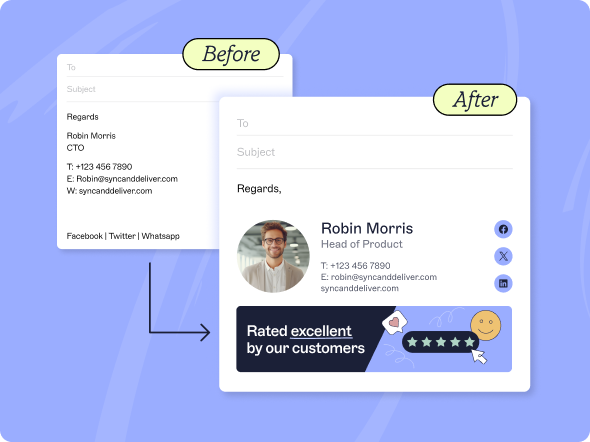
And Exclaimer offers the perfect platform for you to ensure everyone in your company has a professional email signature on every message they send.