Dave is a marketing expert with 15 years experience in the tech and SaaS world. He specializes in educating IT and channel audiences, with a focus on security, privacy, compliance, and marketing technology. With a talent for storytelling and a deep understanding of the industry, Dave transforms complex IT topics into clear, engaging, and impactful narratives.
The email compliance guide: Everything you need to know

TL;DR
- Email compliance means following global laws like GDPR, HIPAA, CAN-SPAM, and CASL to protect data, privacy, and customer trust
- Responsibility is shared across IT, Legal, Marketing, HR, and employees
- Common pitfalls include weak retention policies, missing disclaimers, lack of consent tracking, and outdated security controls
- Non-compliance can lead to major fines, legal action, data breaches, and reputational damage
- Stay compliant by automating disclaimers, enforcing authentication standards, and using centralized email signature management for consistency
Email is one of the most important communication channels for businesses. However, staying compliant with email regulations is critical. With stricter laws around privacy, security, and data protection, email compliance is a top priority for companies of all sizes.
Failing to follow email compliance standards can result in serious consequences. These include legal fines, data breaches, and loss of customer trust. Even small oversights, such as improper email signature management, can create compliance risks.
This guide to email compliance covers everything you need to know. It includes the basics of email compliance and key regulations like GDPR and HIPAA. It also provides best practices for secure email communication and what solutions are available for keeping your business compliant.
What is email compliance?
Email compliance refers to the policies, processes, and technologies that ensure your organization’s email communications follow applicable laws, industry regulations, and internal security requirements. That includes how data is handled, stored, and disclosed. It even relates to how employee email signatures and disclaimers are applied.
In practice, achieving email compliance means:
Protecting sensitive data through encryption, authentication, and secure routing.
Maintaining auditable records for legal or regulatory purposes.
Training staff on data privacy, phishing awareness, and acceptable use.
Using centralized systems to control branding and disclaimers automatically.
Understanding email compliance regulations
Email compliance laws exist to protect individuals’ privacy, reduce spam, and ensure organizations handle personal information responsibly. Whether your business operates locally or globally, understanding these regulations is essential for maintaining trust, avoiding penalties, and keeping every email compliant.
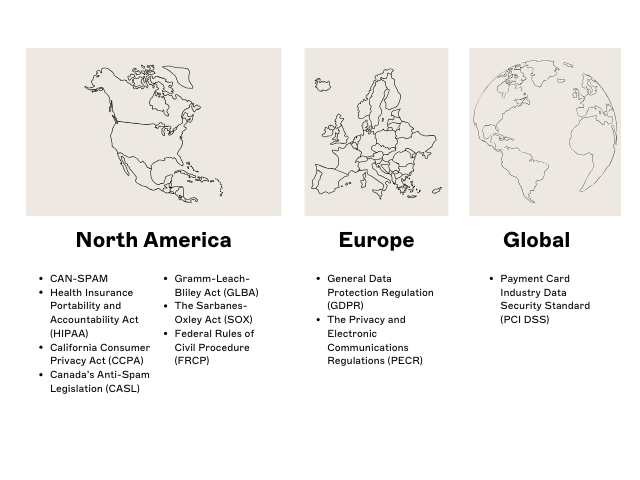 Here’s a breakdown of the most important email compliance regulations and what they mean for your organization:
1. CAN-SPAM Act
The Controlling the Assault of Non-Solicited Pornography And Marketing Act, more commonly known as CAN-SPAM, is a U.S. law that sets rules for commercial email.
To stay compliant, businesses must:
Obtain consent before sending marketing emails
Clearly identify the sender and purpose
Include a visible unsubscribe option
Avoid misleading subject lines or deceptive content
Non-compliance can result in fines of up to $51,744 per email (FTC).
2. General Data Protection Regulation (GDPR)
The General Data Protection Regulation (GDPR) is a data privacy law implemented in the EU in 2018. It regulates how personal data is collected, stored, and used—including in email communication.
Under GDPR email compliance, organizations must:
Gain clear, explicit consent before emailing EU residents
Provide transparent privacy notices
Allow individuals to access, correct, or delete their data (“right to be forgotten”)
Fines for violations can reach up to €20 million or 4% of global annual turnover, whichever is higher.
3. Health Insurance Portability and Accountability Act (HIPAA)
The Health Insurance Portability and Accountability Act (HIPAA) is a U.S. law that sets standards for protecting health information.
Covered entities and business associates must:
Use encrypted and secure email channels for any protected health information (PHI)
Limit access to authorized personnel
Maintain audit logs and safeguard patient data
HIPAA email compliance is critical for healthcare providers, insurers, and vendors handling PHI.
4. Payment Card Industry Data Security Standard (PCI DSS)
The Payment Card Industry Data Security Standard (PCI DSS) applies to any organization processing, storing, or transmitting credit card information.
Key requirements include:
Never sending unencrypted cardholder data via email
Using end-to-end encryption and secure email servers
Maintaining strict access controls and regular security assessments
5. California Consumer Privacy Act (CCPA)
The California legislature enacted the California Consumer Privacy Act (CCPA) in 2018, and it took effect in 2020. It grants California residents rights over how their personal data is collected and shared.
To remain compliant, organizations must:
Disclose data collection and sharing practices clearly
Allow customers to opt out of data sales
Delete personal information upon request
Apply equal protections to California residents, regardless of where the business operates
6. Canada’s Anti-Spam Legislation (CASL)
Canada’s Anti-Spam Legislation (CASL) applies to all electronic messages sent to or from Canadian recipients.
It requires organizations to:
Obtain express or implied consent before sending commercial emails
Clearly identify the sender and include valid contact information
Provide an easy unsubscribe mechanism
Penalties for CASL violations can reach CAD $10 million per violation.
7. The Privacy and Electronic Communications Regulations (PECR)
The Privacy and Electronic Communications Regulations (PECR) governs electronic marketing and data privacy for UK organizations.
To comply, businesses must:
Get opt-in consent before sending marketing emails
Offer a clear and easy opt-out
Protect stored contact information under the UK GDPR framework
8. Gramm-Leach-Bliley Act (GLBA)
The Gramm-Leach-Bliley Act (GLBA) is a U.S. law requiring financial institutions to protect customers’ non-public personal information.
Key requirements include:
Providing written privacy notices to customers
Implementing security programs for data protection
Restricting how information is shared with third parties
Financial institutions must ensure all emails containing customer data are transmitted securely.
9. The Sarbanes-Oxley Act (SOX)
The Sarbanes-Oxley Act (SOX) focuses on corporate transparency and accurate financial reporting.
It impacts email compliance by requiring organizations to:
Retain records related to financial reporting for at least seven years.
Preserve relevant emails as part of audit trails.
Ensure archived emails are tamper-proof and retrievable for investigations.
10. Federal Rules of Civil Procedure (FRCP)
The Federal Rules of Civil Procedure (FRCP) is a set of guidelines for handling civil lawsuits in U.S. courts. It focuses on corporate transparency and accurate financial reporting.
It impacts email compliance by requiring organizations to:
Retain records related to financial reporting for at least seven years.
Preserve relevant emails as part of audit trails.
Ensure archived emails are tamper-proof and retrievable for investigations.
Who’s responsible for email compliance?
Email compliance is a shared responsibility among various stakeholders within an organization. Each function plays a vital role in ensuring that data protection, brand integrity, and regulatory requirements are consistently upheld.
Here’s how the responsibility breaks down across the organization:
| Role / department | Key responsibilities | Why it matters |
|---|---|---|
| IT & security teams | • Configure secure gateways, SPF/DKIM/DMARC • Manage email encryption and authentication • Enforce retention and archiving policies | Forms the technical foundation of compliance—prevents data leaks, spoofing, and unauthorized access. |
| System administrators | • Maintain email archiving and backups • Ensure compliant storage and retrieval • Monitor email traffic for non-compliance | Ensures audit readiness and meets retention requirements (SOX, FRCP, GLBA). |
| Compliance & legal officers | • Define policies for retention, usage, and disclaimers • Conduct audits and respond to legal discovery • Oversee privacy and disclosure statements | Translates regulatory requirements (GDPR, CCPA, CASL) into internal governance and enforceable processes. |
| Marketing & Communications | • Obtain consent and manage opt-outs • Include unsubscribe links and accurate sender info • Use approved templates with disclaimers | High-volume senders—errors here can trigger fines and brand reputation damage. |
| Human Resources (HR) | • Deliver staff training on data protection • Manage onboarding/offboarding access • Track compliance participation | Builds awareness and reduces human error through continuous education. |
| Employees | • Follow approved email policies • Report suspicious activity promptly • Use company email for all official communication | Every message carries legal weight—employee awareness prevents accidental breaches. |
Tip: Centralized email signature management helps each team play their part.
IT and security teams
IT teams are the backbone of email compliance management. They’re responsible for:
Configuring secure email gateways, encryption, and authentication (SPF, DKIM, and DMARC)
Implementing retention and archiving policies to meet regulatory standards (e.g., SOX, FRCP)
Managing permissions, identity access, and threat detection
Ensuring technical integrations support privacy laws like GDPR and HIPAA
Why it matters: IT controls the infrastructure that prevents data leaks, spoofing, and unauthorized access, which is the foundation of compliance.
System administrators
System administrators handle the day-to-day configuration and monitoring of email systems.
They:
Maintain archiving and journaling systems for auditability
Ensure data storage and backups are compliant with retention periods
Monitor email traffic for suspicious or non-compliant activity
Why it matters: Email archiving is a regulatory requirement under frameworks like SOX, GLBA, and HIPAA—accurate retention protects the business during audits or litigation.
Compliance and legal officers
Compliance teams define policy while IT enforces it. Legal and compliance officers:
Develop email retention and acceptable-use policies aligned with laws such as GDPR, CCPA, and CASL
Conduct periodic audits of email communications
Respond to legal discovery and data subject access requests (DSARs)
Review disclaimers and privacy language to ensure accuracy and consistency
Why it matters: Legal and compliance teams translate regulation into actionable policy, minimizing risk exposure and guaranteeing accountability.
Marketing and communications teams
Marketing and brand teams are responsible for ensuring marketing email compliance. This includes consent and transparency. They must:
Obtain and document opt-in consent before sending promotional emails
Include unsubscribe links and accurate sender information
Use approved templates with compliant disclaimers and company information
Why it matters: Marketing teams often send the highest email volumes. Centralized management prevents mistakes that could result in regulatory fines.
Human Resources (HR)
HR ensures employees understand their responsibilities through compliance training. This includes:
Educating staff on phishing, data protection, and proper email etiquette
Managing access to communication tools during onboarding and offboarding
Coordinating with compliance teams to document participation in training programs
Why it matters: Well-trained employees are the first line of defense against compliance violations and data breaches.
All employees
Every employee plays a role in maintaining compliance. They should:
Follow company email usage and retention policies
Use approved channels for sensitive communication
Report phishing attempts or suspicious activity immediately
Avoid sending confidential data through personal or unauthorized accounts
Why it matters: Even one mistake, like forwarding confidential data externally, can trigger a compliance breach or data exposure incident.
What are the most common email compliance pitfalls?
Even the most well-intentioned compliance programs can fail without the right processes and oversight. Email compliance depends on technical controls, employee awareness, and consistent enforcement. Just a single oversight can lead to data exposure, regulatory fines, or reputational damage.
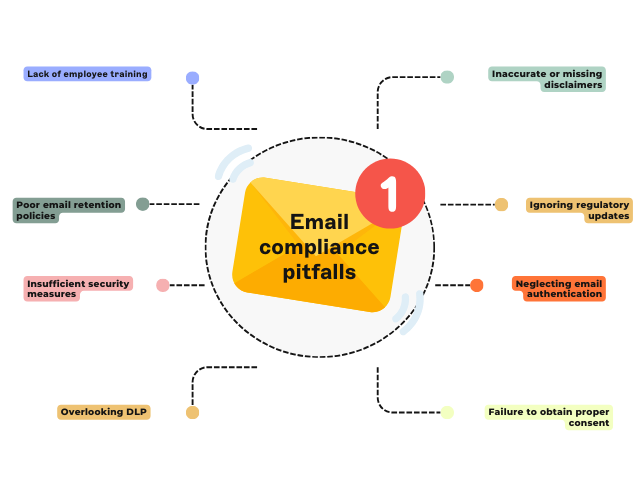 Here are the most frequent email compliance pitfalls organizations encounter and how to prevent them:
1. Lack of employee training
Employees are often the weakest link in compliance. Accidental forwarding, data mishandling, or phishing responses can all result in breaches.
Avoid it by:
Providing regular email security and privacy training
Reinforcing best practices during onboarding and compliance refreshers
Encouraging employees to report suspicious emails promptly
Tip: Combine user education with automated safeguards like data loss prevention (DLP) and centralized policy enforcement to minimize risk.
2. Weak or outdated email retention policies
Failing to define how long emails are stored or deleted can lead to non-compliance with laws such as SOX or the Federal Rules of Civil Procedure (FRCP).
Avoid it by:
Establishing clear retention schedules by department or data type
Using secure, tamper-proof archiving for audit readiness
Reviewing policies annually to align with evolving regulations
Tip: Automated retention policies reduce human error and improve legal defensibility.
3. Insufficient security and encryption controls
Emails that aren’t properly secured can be intercepted or altered in transit. This violates data protection laws like GDPR and HIPAA.
Avoid it by:
Enforcing TLS encryption for all outbound messages
Deploying multi-factor authentication and endpoint protection
Using anti-phishing, anti-spoofing, and spam filtering tools
Tip: Automated retention policies reduce human error and improve legal defensibility.
4. Overlooking data loss prevention (DLP)
Without DLP policies, sensitive data can leave the network through outbound emails—intentionally or accidentally.
Avoid it by:
Configuring DLP rules to flag or block messages containing confidential data (e.g., credit card or medical information)
Monitoring outbound mail for anomalies and unauthorized transfers
Integrating DLP with your email signature management platform for unified policy enforcement
Tip: DLP is a compliance control as well as a security feature.
5. Failure to obtain proper consent
Many email compliance regulations, such as GDPR, CASL, and CAN-SPAM, require explicit consent before sending marketing communications.
Avoid it by:
Maintaining accurate opt-in records
Using verified subscription workflows with double opt-in
Providing a visible, easy-to-use unsubscribe option in every message
Tip: Automate consent tracking across systems to demonstrate compliance during audits.
6. Ignoring email authentication standards
Without SPF, DKIM, and DMARC records properly configured, organizations are vulnerable to spoofing and phishing attacks. This can result in compliance breaches and reputational damage.
Avoid it by:
Implementing SPF to validate authorized senders
Signing all outbound emails with DKIM
Enforcing a DMARC policy that rejects or quarantines unauthenticated mail
Tip: Authentication protects not just your domain reputation but also customer trust.
7. Failing to stay current with regulatory changes
Regulations evolve frequently. What was compliant two years ago might not be today.
Avoid it by:
Subscribing to regulatory updates for your region and industry
Conducting annual compliance audits
Reviewing email disclaimer and privacy language regularly
Tip: Assign ownership for monitoring legal updates to your Compliance or IT governance team.
8. Inaccurate or missing email disclaimers
Outdated or inconsistent email disclaimers are one of the most common compliance gaps.
Avoid it by:
Using centralized email signature management to ensure all disclaimers are up to date and applied automatically.
Customizing disclaimers for each region, business unit, or department.
Reviewing templates with Legal to align with current laws and industry standards.
Tip: Automated disclaimers remove the risk of human error and help prove compliance during audits.
Quick recap: The top email compliance risks
| Pitfall | Resulting risk | How to prevent it |
|---|---|---|
| Lack of employee training | Human error, data leakage | Regular awareness training, policy refreshers |
| Weak retention policies | Legal and audit exposure | Automated archiving and clear retention schedules |
| Insufficient security | Data interception, breaches | Encryption, MFA, phishing filters |
| Missing DLP rules | Accidental data exposure | DLP monitoring and rule enforcement |
| Consent failures | Regulatory fines (GDPR, CAN-SPAM) | Opt-in tracking, unsubscribe links |
| No SPF/DKIM/DMARC | Spoofing, domain misuse | Implement authentication protocols |
| Ignoring updates | Outdated policies | Continuous monitoring and legal reviews |
| Missing disclaimers | Non-compliance, legal risk | Centralized signature management |
| Featured guides on email disclaimers | |
|---|---|
| United States | European Union |
| Canada | United Kingdom |
The consequences of non-compliance
Email is one of the most heavily regulated communication channels and one of the easiest to misuse. When compliance lapses occur, the impact goes far beyond a single incident. Organizations risk legal, financial, and reputational damage that can take years to recover from.
Here are the most common and costly consequences of email non-compliance:
1. Loss of customer trust:
Any compliance breach that exposes sensitive customer information can erode trust in your business. This can lead to missed opportunities and weakened customer loyalty.
Even if penalties are avoided, customers who lose trust in your brand are unlikely to return.
2. Financial penalties
Violating email compliance regulations can result in significant fines. For example, under GDPR, businesses can be fined up to €20 million or 4% of global annual revenue, whichever is higher.
Here’s what’s at stake under key email compliance laws:
| Regulation | Maximum fine or penalty | Applies To |
|---|---|---|
| GDPR (EU) | Up to €20 million or 4% of global annual turnover, whichever is higher | Any organization processing EU citizens’ data |
| HIPAA (U.S.) | Up to $1.9 million per year for repeated violations | Healthcare and related providers |
| CAN-SPAM (U.S.) | Up to $51,744 per offending email (FTC) | All commercial email senders |
| CASL (Canada) | Up to CAD $10 million per violation | All electronic message senders in Canada |
| CCPA (California) | Up to $7,500 per intentional violation | Businesses handling California residents’ data |
3. Legal action and litigation
Non-compliance also opens the door to lawsuits from affected customers, partners, or employees.
Failure to retain or secure email data properly can lead to:
Class-action lawsuits following data breaches
Legal discovery challenges due to missing or tampered records
Increased insurance costs or exclusion from supplier frameworks
Tip: Maintain a defensible email retention and archiving policy. Being able to retrieve complete, unaltered email records is critical during investigations or e-discovery.
4. Operational and reputational damage
Beyond fines or lawsuits, non-compliance disrupts operations and undermines internal confidence. IT teams spend valuable hours responding to incidents. At the same time, Marketing and Legal has to repair the brand’s image.
Tip: Prevention is cheaper than remediation. Automating compliance policies across all departments ensures continuity, reduces IT workload, and reinforces a culture of trust.
8 best practices for email compliance
Compliance is an ongoing effort that requires a combination of proper policies, tools, and employee education.
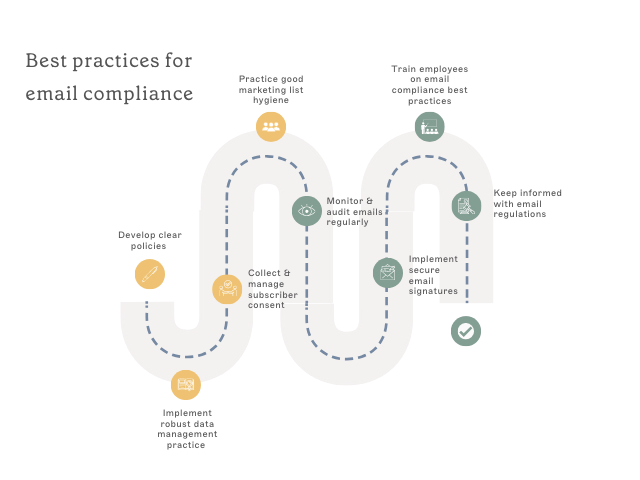 Here are some best practices to make sure your organization stays compliant with email regulations:
1. Develop clear policies
Start by creating clear email guidelines for employees to follow. These should outline:
Appropriate use: Define acceptable and unacceptable content, personal use, and use of company email resources.
Sensitive information: Explain how to handle confidential data, including encryption, password protection, and restrictions on forwarding to unauthorized recipients.
Retention periods: Specify how long emails are stored before archiving or deleting, following company policy or legal requirements.
Monitoring: Clarify the lawful reasons for email monitoring, how it works, and its importance for compliance, security, and productivity.
2. Implement robust data management practice
Data management is a critical aspect of email compliance. Ensure you have processes in place to securely store and retrieve emails when needed, including:
Email archiving: Implement an email archiving solution that automatically captures, indexes, and stores all incoming and outgoing emails. Ensure they are saved in a tamper-proof format. This allows for easy retrieval for legal or regulatory requests.
Secure deletion: Develop policies to determine how long to keep emails. Delete them permanently after that period to reduce privacy risks associated with unnecessary storage.
3. Collect and manage subscriber consent
Getting consent before adding someone to your email list is key to building trust and following privacy laws. Here’s how to do it right:
a. Ask for clear, active consent
Make sure people intentionally agree to hear from you. Use simple, well-worded signup forms that explain:
What kinds of emails they’ll receive
How often they’ll hear from you
b. Be upfront and transparent
Let subscribers know:
Why you’re sending them emails
What value they’ll get from signing up
Exactly what to expect and when
c. Give them control
Make it easy for subscribers to:
Unsubscribe anytime with a clear, visible link in every email
Honor opt our requests promptly
Adjust their preferences, like email frequency or topics, to suit their needs
4. Practice good marketing list hygiene
Regularly cleaning your email list is key to a winning email marketing strategy. Over time, your list can fill up with inactive subscribers, outdated addresses, or people who’ve lost interest.
By removing these contacts, you’ll boost your open and click-through rates.
Why is this so important?
Better performance: A clean list improves email effectiveness so you're talking to engaged subscribers.
Stay compliant: Laws like CAN-SPAM and GDPR require you to email only those who’ve opted in.
Stronger sender reputation: Outdated emails and spam traps can drag down your deliverability. A fresh list keeps your emails landing in inboxes, not spam folders.
5. Monitor and audit emails regularly
Regular email reviews are a smart way to keep your company compliant and reduce risks. Consider the following:
Catch issues early: Spot problems like sensitive info leaks, inappropriate content, or potential data breaches before they escalate.
Ensure policy compliance: Make sure employees follow company rules and industry standards.
Identify training needs: Pinpoint areas where your team might need extra guidance.
Stay audit-ready: Properly archive communications to meet legal and regulatory requirements for audits, disputes, or record-keeping.
6. Implement secure email signatures and disclaimers
Implementing automated email signatures is essential for consistency, legal protection, and increasing your brand's professionalism. Here's why they're important:
Maintain professionalism: Signatures show that your emails are official company communications.
Legal protection: Email disclaimers can limit your liability in case of legal action. By including a disclaimer, you make it clear that your emails are private and confidential.
Branding and consistency: A standardized email signature with company logo and contact information helps build brand recognition.
7. Train employees on email compliance best practices
Educating employees on email best practices is key to keeping your organization secure and compliant. Here’s how to make it simple and engaging:
Spot suspicious emails: Teach employees how to identify phishing attempts, unusual links, and unexpected attachments. Watch for red flags like spelling or grammar mistakes, requests for sensitive information, or urgent messages pressuring quick responses.
Handle sensitive data safely: Use encryption tools and password-protected files to share confidential information securely. Avoid sending sensitive data over unsecured networks or to unauthorized recipients.
Understand the risks: Explain the consequences of mishandling emails, including data breaches, legal penalties, and reputational damage.
Make training hands-on: Run regular workshops and conduct mock phishing exercises to strengthen security awareness. Additionally, create clear and simple email policies to guide safe communication practices.
8. Keep informed with email regulations
Staying on top of email regulations is essential to keep your communication compliant. Here’s what you need to know:
Know the rules: Laws like GDPR and CAN-SPAM are updated often to protect privacy and consumer rights.
Review your policies: Regularly check your consent management, data storage, and opt-out processes. Make sure they meet the latest requirements.
Audit your system: Regular audits can help you spot any gaps or areas to improve.
Not sure about specific rules? Reach out to a legal expert or compliance specialist to avoid fines and protect your brand’s reputation.
The top solutions for simplifying email compliance
Effective email compliance management solutions are essential for meeting regulatory requirements, protecting data, and safeguarding communications.
Here’s an overview of the main types of solutions commonly used by IT professionals along with some notable vendors in each category:
1. Email encryption
These products protect sensitive information by encrypting email content and attachments. This means only authorized recipients can access the information.
Proofpoint Encryption: Offers policy-driven encryption and secure delivery of sensitive messages.
Mimecast Secure Messaging: Provides user-friendly encryption for outbound emails with tracking capabilities.
Virtru: Enables end-to-end encryption that integrates seamlessly with Gmail and Outlook.
2. Email archiving
Archiving solutions automatically store emails in a secure, searchable repository. This is helpful for retaining business communications, legal discovery, and regulatory audits.
Barracuda Message Archiver: Offers cloud and on-premises solutions for secure email archiving with easy search functions.
Microsoft Purview (formerly Microsoft Compliance): Features scalable archiving with strong integration for Office 365 users.
Google Vault: A simple archiving option for Gmail users with tools for retention, eDiscovery, and more.
3. Email monitoring and policy management
Solutions in this category ensure email communications adhere to company policies and compliance regulations by monitoring or filtering messages. They help organizations reduce risks associated with improper communications.
Exclaimer: Allows centralized control over email signatures, ensuring consistent and compliant branding across all emails.
SPF/DKIM/DMARC Management Tools (e.g., Agari, DMARC Analyzer): These monitor and enforce email authentication protocols to prevent spoofing and phishing.
Tessian: Analyzes email behaviors to detect human errors and prevent data breaches.
4. Email data loss prevention (DLP)
DLP solutions prevent sensitive information from leaving the organization. They do this by scanning outbound email contents for compliance violations or unauthorized sharing.
Symantec Email Security (Broadcom): Includes strong DLP features for email with advanced scanning capabilities.
Forcepoint Email Security: Monitors emails for regulatory-sensitive information, offering automated remediation options.
Microsoft Defender for Office 365: Offers customizable DLP policies and sensitivity labels to meet compliance needs.
5. Anti-spam and compliance gateways
These solutions block unwanted emails to ensure adherence to anti-spam laws. They also provide security and compliance features.
SpamTitan (TitanHQ): Combines anti-spam, email filtering, and compliance features.
Cisco Secure Email (formerly IronPort): Provides robust filtering alongside encryption and archiving options.
SonicWall Email Security: A solution for preventing spam, phishing, and regulatory violations.
6. Email threat intelligence
Solutions in this category help secure email and support compliance. They detect malicious or fraudulent activity that could lead to regulatory breaches.
Proofpoint Essentials: Offers advanced threat protection for smaller organizations while ensuring compliance.
Egress Defend: Combines threat detection with tools for protecting sensitive data and maintaining compliance.
Trend Micro Email Security: Integrates AI-driven threat analysis with compliance-specific capabilities.
Take the proactive approach to email compliance
Email compliance shouldn’t just be viewed as a checkbox exercise to avoid penalties or legal troubles. Instead, see it as an important business strategy for protecting your customers and enhancing their experience. This approach also helps build trust in your brand. When your organization prioritizes compliance, it will lead to long-term business success.
By thoroughly understanding key regulations, adopting best practices, and using advanced email compliance solutions, your organization can confidently manage its email communications. This approach also helps foster a positive reputation.
Get ahead of regulatory risk with our practical email compliance checklist for IT professionals.