Support for Exchange 2019 has ended. Your signature setup might be at risk.
17 November 2025
0 min read
Microsoft officially ended support for Exchange 2019 on October 14, 2025. If you’re still running email signature systems tied to Exchange mail flow rules or PowerShell scripts, you’re now operating in unsupported territory.
With Exchange support over, anything built on top of it no longer has a stable foundation. No more security patches. No bug fixes. No guarantees that today’s setup will still work tomorrow.
For IT teams, that risk usually shows up quietly, then all at once.
DIY signature systems were built for Exchange, not for what’s next
Many in-house signature management tools were created years ago, using Exchange transport rules, PowerShell scripts, or a mix of both. At the time, that approach seemed reasonable. Exchange was stable, predictable, and fully supported.
The problem is that those tools are tightly coupled to an environment that no longer exists in the same way:
Exchange-based logic doesn’t map cleanly to Microsoft 365 and modern hybrid setups
Scripts that once worked reliably now depend on deprecated APIs or undocumented behavior
There’s no longer a supported platform underneath them
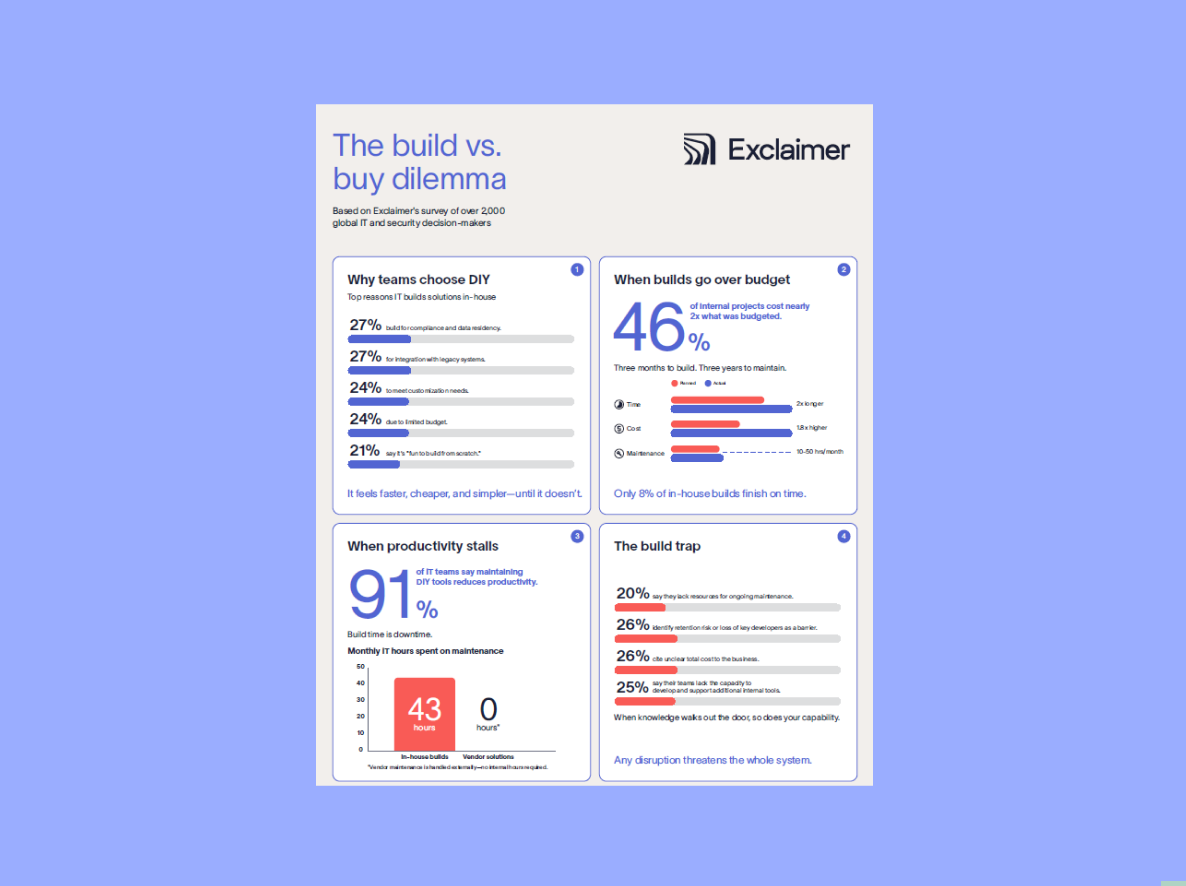
Problems like this aren’t unique to signature management. According to Exclaimer’s Build vs. Buy research, 71% of internal tools are eventually abandoned, often because they become too complex or risky to maintain over time.
The longer homegrown systems stay in place, the more manual effort and hidden risk IT inherits.
What’s breaking and who owns the risk now
As Exchange-era tools age out, failures don’t always look dramatic. They’re often subtle, intermittent, and easy to miss until someone outside IT notices.
PowerShell workflows can fail silently as Microsoft 365 and hybrid environments change
Disclaimers render incorrectly or drop off emails entirely
Branding becomes inconsistent across clients and devices
Updates require hands-on fixes instead of simple configuration changes
At the same time, governance gaps start to show.
No reliable audit trails
No role-based access controls
No clear separation between IT, legal, and marketing responsibilities
And because these tools are now unsupported, every issue lands back on IT.
That ownership cost adds up quickly. The Build vs. Buy report found that 64% of IT teams experience downtime or user-facing issues caused by internal builds, and 91% say those tools actively slow their ability to innovate. Time spent fixing legacy systems is time not spent on higher-impact work.
Rebuilding isn’t just time-consuming. It’s a step backward
One option is to rebuild DIY signature tools. In practice, this usually means:
Recreating Exchange-style mail flow logic inside Microsoft 365
Rewriting scripts to keep up with a constantly changing API landscape
Manually maintaining legal disclaimers, branding rules, and edge cases
That’s a lot of effort to get back to where you already were, without solving the underlying problem.
Our Build vs. Buy data shows why this approach rarely pays off. Internal tools require ongoing development, testing, documentation, and support. What starts as a lightweight solution becomes another system for IT to support indefinitely.
Rebuilding doesn’t remove risk. It just resets the clock.
Cloud-native signature tools eliminate the risk
Cloud-native signature management platforms are designed for the environments IT teams actually run today.
No dependency on on-prem Exchange infrastructure or custom scripts
Native compatibility with Microsoft 365 and Google Workspace
Centralized control over signatures, disclaimers, and branding
Built-in audit logs, role-based access, and compliance support
Updates, security fixes, and platform changes are handled by the vendor, not rebuilt each time Microsoft changes something upstream. That shift alone removes a significant operational burden.
Instead of maintaining fragile tooling, IT gets a supported system with clear ownership, defined SLAs, and predictable behavior.
EOL is your signal to stop building and start scaling
Exchange 2019 reaching end of life is more than a date on a calendar. It’s a clear reminder that Exchange-era signature management wasn’t built to last.
Modern IT teams don’t spend their valuable time patching legacy tools just to keep the lights on. They move to platforms that scale, stay supported, and reduce risk over time. And they take back control with tools designed for today’s infrastructure.
If you’re still maintaining Exchange-based signature systems, it’s time to move on. See how Exclaimer replaces risk with a reliable, cloud-native approach.